Close Menu
MatlabLegend
    Facebook X (Twitter) Instagram
    MatlabLegend
    • Home
    • Matlab
    • Fashion
    • Gadgets
    • Biography
    • Tech News
    • Tips & Tricks
    MatlabLegend
    Home»Matlab»MATLAB Function Reference
    Matlab

    MATLAB Function Reference

    JanisBy JanisJanuary 12, 2025No Comments3 Mins Read
    Facebook Twitter Pinterest LinkedIn Tumblr Email

    Display a legend for an Axes

    Description

    The legend function adds a legend to a plot. Each entry in the legend corresponds to a graphical element in the plot, such as a line or filled area. The legend shows a sample of the line style, marker, and color next to the text label you provide. For filled areas, the legend will display a sample of the face color next to the label. You can move the legend interactively by dragging it with the mouse after it appears.

    • legend('string1', 'string2', ...): Displays a legend in the current Axes with the specified strings as labels for each data series.
    • legend(Strings): Displays a legend using the rows of the matrix Strings as labels. This is equivalent to specifying legend(Strings(1,:), Strings(2,:), ...).
    • legend(h, Strings): Associates each row of the Strings matrix with the corresponding graphical objects in the vector h.
    • legend('off'): Removes the legend from the current Axes or the Axes specified by h.
    • legend(h, ...): Specifies the legend for the Axes defined by h.
    • legend(..., pos): Specifies the position of the legend using the pos argument.
      • pos = -1: Places the legend outside the Axes boundary on the right side.
      • pos = 0: Places the legend inside the Axes boundary, minimizing obscured points.
      • pos = 1: Places the legend in the upper-right corner of the Axes (default).
      • pos = 2: Places the legend in the upper-left corner of the Axes.
      • pos = 3: Places the legend in the lower-left corner of the Axes.
      • pos = 4: Places the legend in the lower-right corner of the Axes.
      • pos = [XlowerLeft YlowerLeft]: Specifies the lower-left position of the legend in normalized coordinates.
    • h = legend(...): Returns a handle to the legend, which is an Axes graphics object.

    Remarks

    The legend function associates the specified strings with graphical objects in the Axes in the order they appear in the Axes.Children property. By default, the legend annotates the current Axes. MATLAB allows only one legend per Axes. The position of the legend is determined by various factors, such as which plot elements might be obscured. To move the legend, click and drag it with the mouse. If your mouse has multiple buttons, use the left mouse button.

    Example

    Add a legend to a plot showing a sine and cosine function:
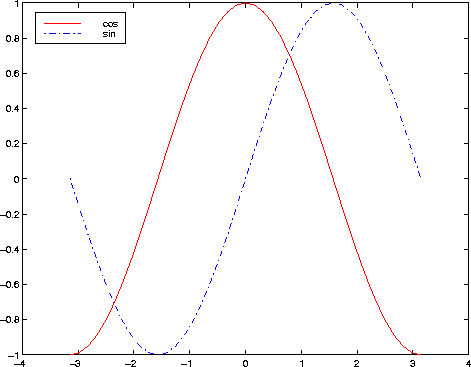
    In this example, the plot command uses a solid red line (‘-r’) for the cosine function and a dash-dot blue line (‘-.b’) for the sine function.

    Janis
    • Website

    Janis is the creator of Matlab Legend, an engineer and tech enthusiast passionate about simplifying MATLAB, AI, and tech concepts. Through practical guides and insights, they aim to empower learners and professionals worldwide.

    Related Posts

    Legend Behavior in Data Visualization: Automatic Labeling and Updates

    February 5, 2025

    Greek Letters and Special Characters in Chart Text

    January 31, 2025

    Make the Graph Title Smaller

    January 31, 2025
    Leave A Reply Cancel Reply

    Search
    Recent Posts

    How to Book a Bus from Kelantan to Melaka Online

    April 2, 2026

    Kineret Karen Ben Yishay Moore: Exploring the Meaning, Heritage, and Identity Behind the Name

    February 28, 2026

    Kevin Corke Biography: Wife, Spouse, and Family Insights

    February 19, 2026

    Elena Moussa Height: Discover How Tall Greg Gutfeld’s Wife Really Is and Why It Matters

    February 18, 2026

    Kurt Perez and The Blacklist: The Real Story Explained

    February 17, 2026

    Jaguar Wright’s Net Worth in 2026: Inside the Neo-Soul Singer’s $2.5 Million Success Story

    February 17, 2026
    About Us

    MatlabLegend is your go-to hub for mastering MATLAB with clarity and confidence. Explore expert insights, step-by-step tutorials, and practical guides designed for beginners and professionals alike.

    Whether you're starting out or advancing research and engineering projects, MatlabLegend helps you learn faster and apply MATLAB skills effectively every day. #MatlabLegend

    Popular Posts

    How to Book a Bus from Kelantan to Melaka Online

    April 2, 2026

    Kineret Karen Ben Yishay Moore: Exploring the Meaning, Heritage, and Identity Behind the Name

    February 28, 2026
    Contact Us

    Phone: Whatsapp

    Mail: tech4links@gmail.com

    เว็บหวยออนไลน์ | UFABET | kết quả bóng đá

    Copyright © 2026 | All Rights Reserved | MatlabLegend
    • About Us
    • Contact Us
    • Disclaimer
    • Privacy Policy
    • Terms and Conditions
    • Write for Us
    • Sitemap

    Type above and press Enter to search. Press Esc to cancel.

    WhatsApp us