

Display a legend for an Axes
Description
The legend function adds a legend to a plot. Each entry in the legend corresponds to a graphical element in the plot, such as a line or filled area. The legend shows a sample of the line style, marker, and color next to the text label you provide. For filled areas, the legend will display a sample of the face color next to the label. You can move the legend interactively by dragging it with the mouse after it appears.
legend('string1', 'string2', ...): Displays a legend in the current Axes with the specified strings as labels for each data series.legend(Strings): Displays a legend using the rows of the matrixStringsas labels. This is equivalent to specifyinglegend(Strings(1,:), Strings(2,:), ...).legend(h, Strings): Associates each row of theStringsmatrix with the corresponding graphical objects in the vectorh.legend('off'): Removes the legend from the current Axes or the Axes specified byh.legend(h, ...): Specifies the legend for the Axes defined byh.legend(..., pos): Specifies the position of the legend using theposargument.pos = -1: Places the legend outside the Axes boundary on the right side.pos = 0: Places the legend inside the Axes boundary, minimizing obscured points.pos = 1: Places the legend in the upper-right corner of the Axes (default).pos = 2: Places the legend in the upper-left corner of the Axes.pos = 3: Places the legend in the lower-left corner of the Axes.pos = 4: Places the legend in the lower-right corner of the Axes.pos = [XlowerLeft YlowerLeft]: Specifies the lower-left position of the legend in normalized coordinates.
h = legend(...): Returns a handle to the legend, which is an Axes graphics object.
Remarks
The legend function associates the specified strings with graphical objects in the Axes in the order they appear in the Axes.Children property. By default, the legend annotates the current Axes. MATLAB allows only one legend per Axes. The position of the legend is determined by various factors, such as which plot elements might be obscured. To move the legend, click and drag it with the mouse. If your mouse has multiple buttons, use the left mouse button.
Example
Add a legend to a plot showing a sine and cosine function:
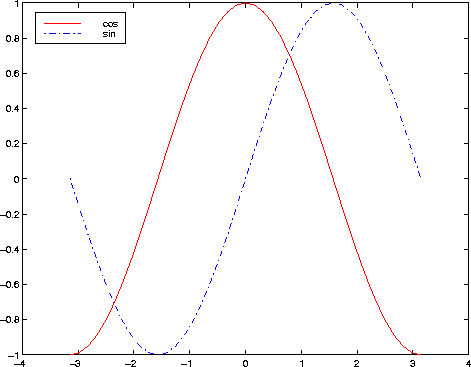
In this example, the plot command uses a solid red line (‘-r’) for the cosine function and a dash-dot blue line (‘-.b’) for the sine function.
